

1. Preface
|
|
2. About this manual
2.1. Language
3. Product overview
3.1. Intended use
3.2. Product description
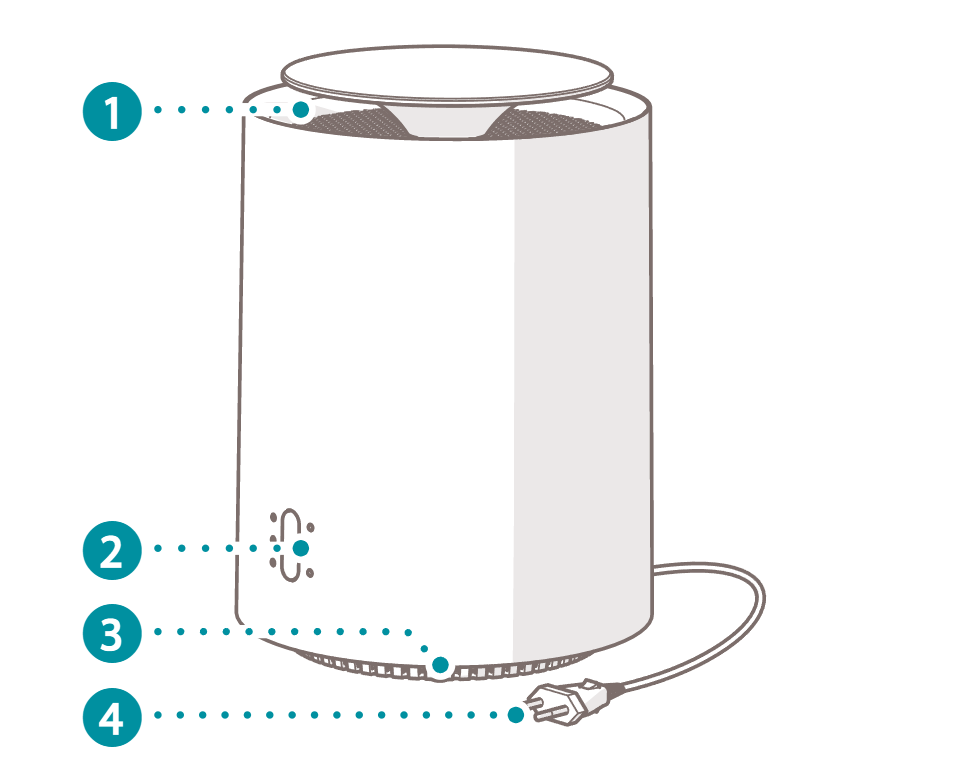
3.3. Main parts
|
|
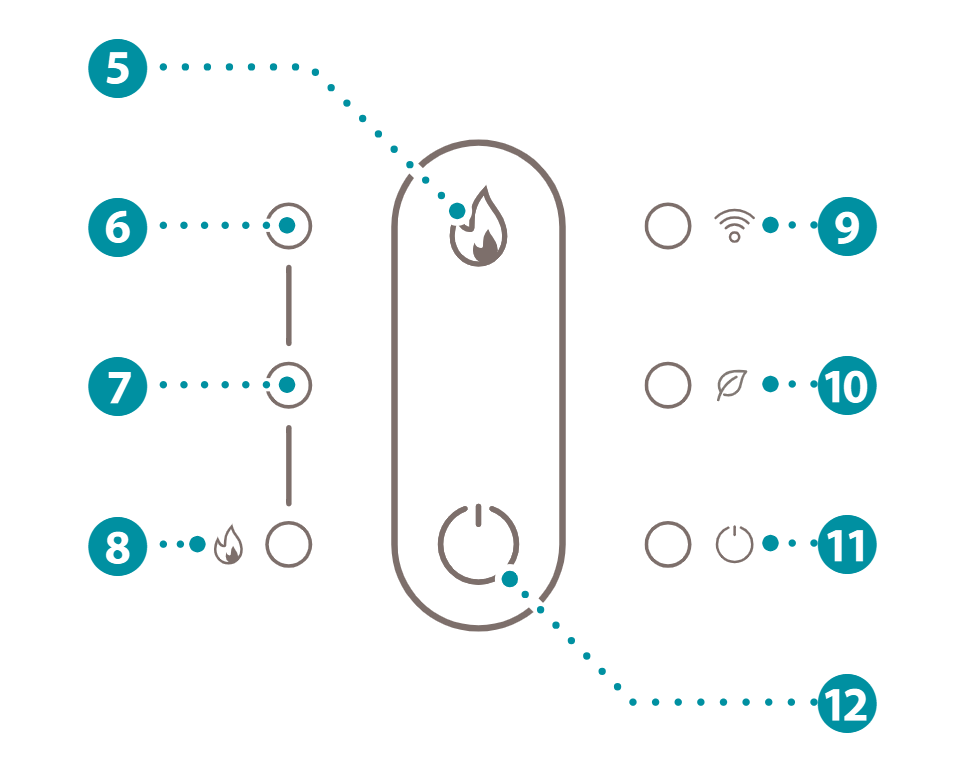
3.4. Controls
|
|
4. Safety instructions
4.1. Signal words in this manual
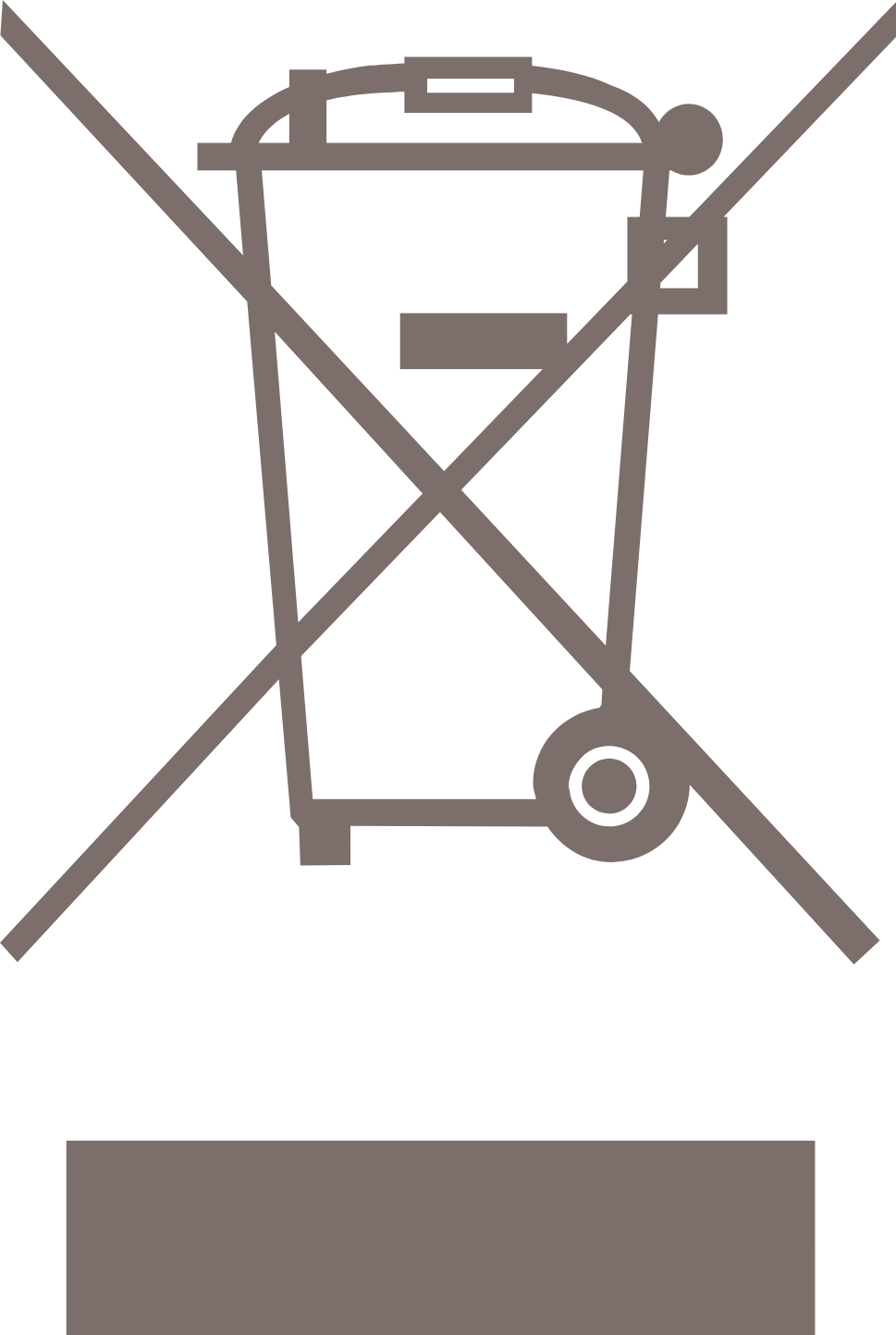
4.2. Symbols on the product

|
|

|
|

|
|
|
|

|
4.3. Safety warnings and regulations
5. Installation
5.1. Placing the product
1. Place the product upright on a stable and flat surface, at least 50 cm from other objects.
6. Use
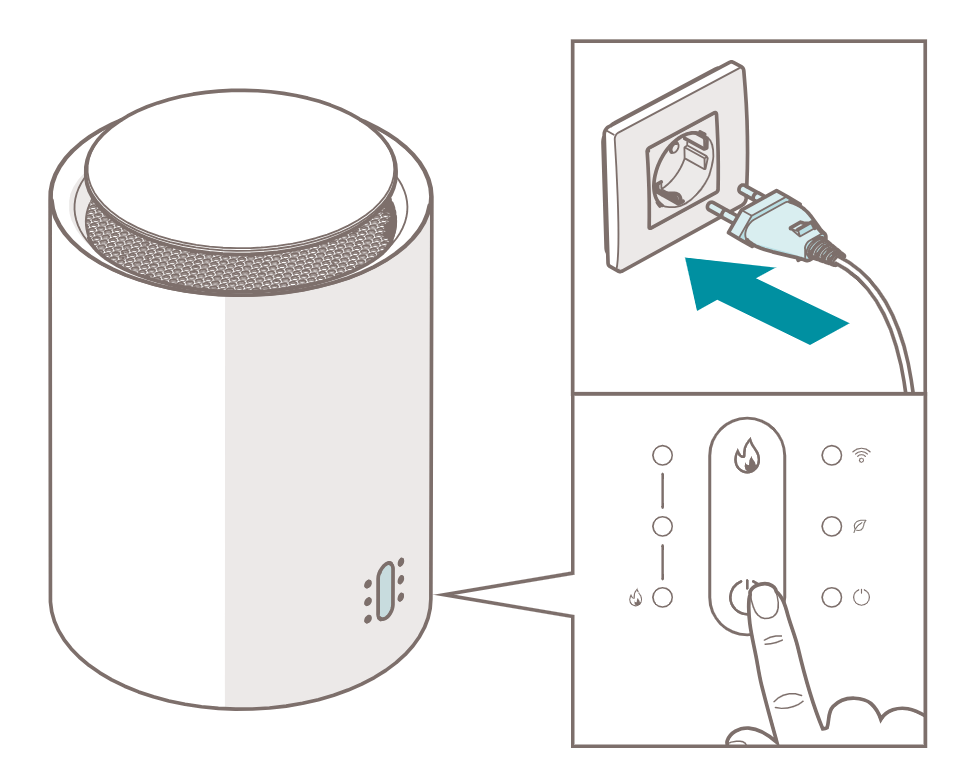
6.1. Switching on the product
|
1. Plug the power cord 4 into a power outlet.
2. Press the power button e to switch on the product.
6.2. Installing the Duux app

|
6.3. Using the product
|
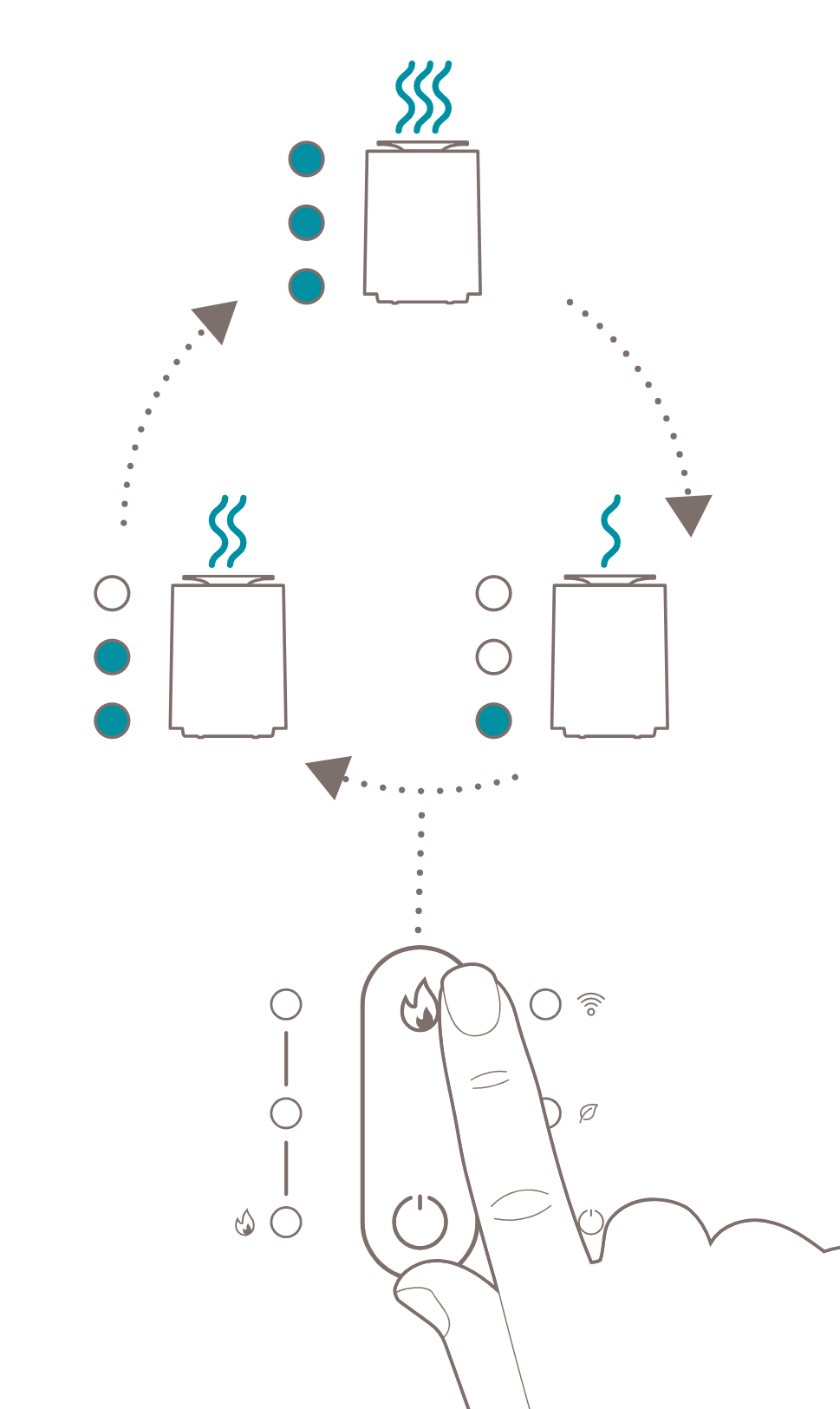
1. Press the heating level button 5 to cycle through the heating levels.
 . Heating level III is active.
 . Heating level II is active.
 . Heating level I is active.
6.4. Using the ECO mode
1. Press and hold the on/off button for ~3 seconds when the product is switched on to activate the ECO mode.
1. Press and hold the on/off button for ~3 seconds when the product is switched on to deactivate ECO mode.
6.5. Switching off the product
2. Press the power button e to switch off the product.
3. Remove the power cord 4 from the power outlet.
7. Maintenance
7.1. Cleaning
|
|
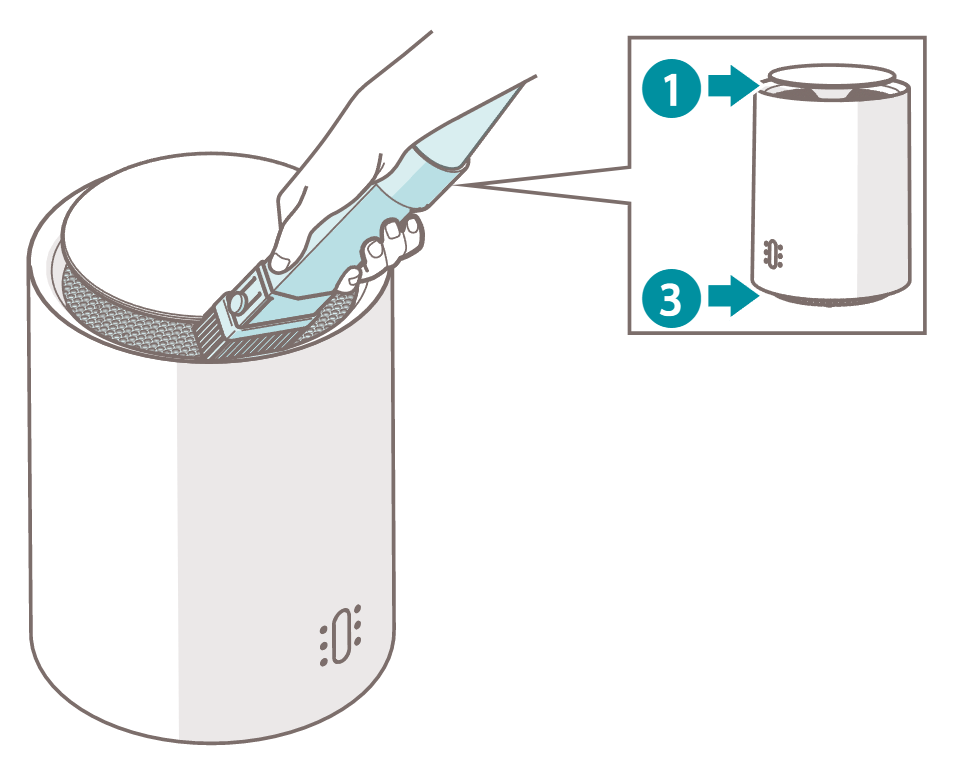
1. Clean the air inlet 3 and the air outlet 1 with a vacuum cleaner.
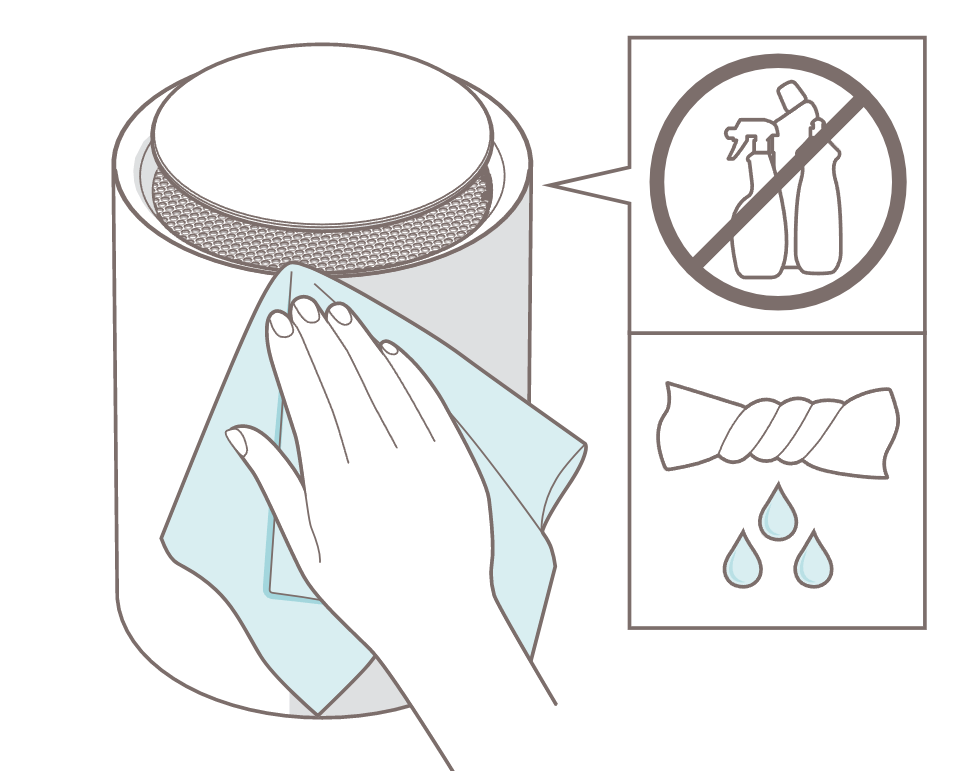
2. Clean the outside of the product with a soft, slightly damp cloth.
3. Dry the outside of the product with a soft, dry cloth.
7.2. Storing
7.3. Spare parts
8. FAQ
|
|
||
9. Warranty
10. Disposal
11. Technical specifications

|
||

|
||

|
||

|
||
|
||

|
||

|
||

|
||

|
||

|
||

|
||

|
||

|
||
|
|
||
|
|
||

|
||
|
||

|
||

|
||
12. Simplified EU declaration of conformity
1. Voorwoord
|
|
2. Over deze handleiding
2.1. Taal
3. Productoverzicht
3.1. Beoogd gebruik
3.2. Beschrijving van het product
3.3. Belangrijkste onderdelen
|
|
|
3.4. Bedieningselementen
|
|
|
4. Veiligheidsvoorschriften
4.1. Signaalwoorden in deze handleiding
4.2. Symbolen op het product
|
|
|
|
|
|
|
|
|
|
|
|
|
|
4.3. Veiligheidswaarschuwingen en -voorschriften
5. Installatie
5.1. Het product installeren
1. Plaats het product rechtop op een stabiele en vlakke ondergrond op een afstand van minimaal 50 cm van andere voorwerpen.
6. Gebruik
6.1. Het product inschakelen
|
|
1. Sluit het netsnoer 4 aan op een stopcontact.
2. Druk op de aan/uit-knop e om het product in te schakelen.
6.2. Installeren van de Duux-app
|
|
6.3. Gebruik van het product
|
|
1. Druk op de knop voor het verwarmingsniveau 5 om de verwarmingsstanden te doorlopen.
. Verwarmingsniveau III is actief.
. Verwarmingsniveau II is actief.
. Verwarmingsniveau I is actief.
6.4. De ECO-modus gebruiken
1. Wanneer het product is ingeschakeld, houd de aan/uit-knop ~3 seconden ingedrukt om de ECO-modus te activeren.
1. Wanneer het product is ingeschakeld, houd de aan/uit-knop ~3 seconden ingedrukt om de ECO-modus te de-activeren.
6.5. Het product uitschakelen
2. Druk op de aan/uit-knop e om het product uit te schakelen.
3. Haal de stekker 4 uit het stopcontact.
7. Onderhoud
7.1. Reinigen
|
|
|
|
1. Reinig de luchtinlaat 3 en de luchtuitlaat 1 met een stofzuiger.
2. Reinig de buitenkant van het product met een zachte, licht vochtige doek.
3. Droog de buitenkant van het product af met een zachte, droge doek.
7.2. Opslag
7.3. Reserveonderdelen
8. Veelgestelde vragen
|
|
||
9. Garantie
10. Afvoer
11. Technische specificaties
|
|
||
|
|
||
|
|
||
|
|
||
|
|
||
|
|
||
|
|
||
|
|
||
|
|
||
|
|
||
|
|
||
|
|
||
|
|
||
|
|
||
|
|
||
|
|
||
|
|
||
|
|
||
|
|
||
12. Vereenvoudigde EU-conformiteitsverklaring
1. Vorwort
|
|
2. Über dieses Handbuch
2.1. Sprache
3. Produktübersicht
3.1. Bestimmungsgemäße Verwendung
3.2. Produkt-Beschreibung
3.3. Zentrale Bestandteile
|
|
|
3.4. Steuerung
|
|
|
4. Sicherheitshinweise
4.1. Signalwörter in diesem Handbuch
4.2. Symbole auf dem Produkt
|
|
|
|
|
|
|
|
|
|
|
|
|
|
4.3. Sicherheitshinweise und Vorschriften
5. Installation
5.1. Das Produkt aufstellen
1. Stelle das Produkt aufrecht auf eine stabile und ebene Oberfläche mit mindestens 50 cm Abstand zu anderen Gegenständen.
6. Verwendung
6.1. Das Produkt einschalten
|
|
1. Stecke den Stecker 4 in eine Steckdose.
2. Drücke die Taste Ein/Aus e , um das Produkt einzuschalten.
6.2. Installation der Duux-App
|
|
6.3. Das Produkt verwenden
|
|
1. Durch Drücken der Taste 5 werden die verschiedenen Heizstufen durchlaufen.
aufleuchten. Die Heizstufe III ist aktiv.
aufleuchten. Die Heizstufe II ist aktiv.
aufleuchten. Heizstufe I ist aktiv.
6.4. ECO-Modus verwenden
1. Drücke und halte die An/Aus-Taste beim Einschalten des Gerätes drei Sekunden lang gedrückt, um den ECO-Modus zu aktivieren.
1. Drücke und halte die An/Aus-Taste beim Einschalten des Gerätes drei Sekunden lang gedrückt, um den ECO-Modus zu deaktivieren.
6.5. Das Produkt ausschalten
2. Drücke die Taste Ein/Aus e , um das Produkt auszuschalten.
3. Ziehe das Netzkabel 4 aus der Steckdose.
7. Wartung und Pflege
7.1. Reinigung
|
|
|
|
1. Reinigen Sie den Lufteinlass 3 und den Luftauslass 1 mit einem Staubsauger.
2. Reinige die Außenseite des Produkts mit einem weichen, leicht feuchten Tuch.
3. Trockne die Außenseite des Produkts mit einem weichen, trockenen Tuch ab.
7.2. Lagerung
7.3. Ersatzteile
8. FAQ
|
|
||
9. Garantie
10. Entsorgung
11. Technische Angaben
|
|
||
|
|
||
|
|
||
|
|
||
|
|
||
|
|
||
|
|
||
|
|
||
|
|
||
|
|
||
|
|
||
|
|
||
|
|
||
|
|
||
|
|
||
|
|
||
|
|
||
|
|
||
|
|
||
12. Vereinfachte EU-Konformitätserklärung
1. Prefacio
|
|
2. Acerca de este manual
2.1. Idioma
3. Descripción general del producto
3.1. Uso previsto
3.2. Descripción del producto
3.3. Componentes principales
|
|
|
3.4. Controles
|
|
|
4. Instrucciones de seguridad
4.1. Palabras de advertencia en este manual
4.2. Símbolos del producto
|
|
|
|
|
|
|
|
|
|
|
|
|
|
4.3. Advertencias y normas de seguridad
5. Instalación
5.1. Colocación del aparato
1. Coloque el aparato en posición vertical sobre una superficie estable y plana, a una distancia mínima de 50 cm de otros objetos.
6. Uso
6.1. Encender el aparato
|
|
1. Conecte el cable de alimentación 4 a una toma de corriente.
2. Pulse el botón de encendido e para encender el aparato.
6.2. Instalación de la aplicación Duux
|
|
6.3. Uso del producto.
|
|
1. Pulse el botón de nivel de calefacción 5 para pasar por los diferentes niveles de calefacción.
. El nivel de calefacción III está activo.
. El nivel de calefacción II está activo.
. El nivel de calefacción I está activo.
6.4. Uso del modo ECO
1. Mantenga pulsado el botón de encendido/apagado durante unos 3 segundos con el aparato encendido para activar el modo ECO.
1. Mantenga pulsado el botón de encendido/apagado durante unos 3 segundos con el aparato encendido para desactivar el modo ECO.
6.5. Apagar el aparato
2. Mantenga pulsado el botón de encendido e para apagar el aparato.
3. Desconecte el cable de alimentación 4 de la toma de corriente.
7. Mantenimiento
7.1. Limpieza
|
|
|
|
1. Limpie la entrada 3 y la salida de aire 1 con un aspirador.
2. Limpie el exterior del aparato con un paño suave y ligeramente húmedo.
3. Seque el exterior del aparato con un paño suave y seco.
7.2. Conservación
7.3. Piezas de repuesto
8. Preguntas frecuentes
|
|
||
9. Garantía
10. Eliminación
11. Especificaciones técnicas
|
|
||
|
|
||
|
|
||
|
|
||
|
|
||
|
|
||
|
|
||
|
|
||
|
|
||
|
|
||
|
|
||
|
|
||
|
|
||
|
|
||
|
|
||
|
|
||
|
|
||
|
|
||
|
|
||
12. Declaración de conformidad simplificada de la UE
1. Préface
|
|
2. À propos de ce manuel
2.1. Langue
3. Aperçu du produit
3.1. Utilisation prévue
3.2. Description du produit
3.3. Parties principales
|
|
|
3.4. Commandes
|
|
|
4. Consignes de sécurité
4.1. Mentions d’avertissement dans ce manuel
4.2. Symboles sur le produit
|
|
|
|
|
|
|
|
|
|
|
|
|
|
4.3. Avertissements de sécurité et réglementations
5. Installation de l’appareil
5.1. Installation du produit
1. Placez le produit en position verticale sur une surface stable et plate, à plus de 50 cm d'autres objets.
6. Utilisation
6.1. Allumer le produit
|
|
1. Connectez le cordon d’alimentation 4 à une prise de courant.
2. Appuyez sur le bouton d’alimentation e pour allumer le produit.
6.2. Installation de l’application Duux
|
|
6.3. Utilisation du produit
|
|
1. Appuyez sur le bouton de niveau de chauffage 5 pour faire défiler les différents niveaux de chauffage.
. Le niveau de chauffage III est actif.
. Le niveau de chauffage II est actif.
. Le niveau de chauffage I est actif.
6.4. Utilisation du mode ECO
1. Appuyez sur le bouton marche/arrêt et maintenez-le enfoncé pendant environ 3 secondes lorsque le produit est allumé pour activer le mode ECO.
1. Appuyez sur le bouton marche/arrêt et maintenez-le enfoncé pendant environ 3 secondes lorsque le produit est allumé pour désactiver le mode ECO.
6.5. Éteindre le produit
2. Appuyez sur le bouton d’alimentation e pour éteindre le produit.
3. Retirez le cordon d’alimentation 4 de la prise de courant.
7. Maintenance
7.1. Nettoyage
|
|
|
|
1. Nettoyez l’entrée d’air 3 et la sortie d’air 1 avec un aspirateur.
2. Nettoyez l’extérieur du produit avec un chiffon doux et légèrement humide.
3. Séchez l’extérieur du produit avec un chiffon doux et sec.
7.2. Stockage
7.3. Pièces de rechange
8. FAQ
|
|
||
9. Garantie
10. Élimination
11. Caractéristiques techniques
|
|
||
|
|
||
|
|
||
|
|
||
|
|
||
|
|
||
|
|
||
|
|
||
|
|
||
|
|
||
|
|
||
|
|
||
|
|
||
|
|
||
|
|
||
|
|
||
|
|
||
|
|
||
|
|
||
12. Déclaration de conformité simplifiée de l’UE